
Secure File Sharing For Business, Without A VPN Or A Migration
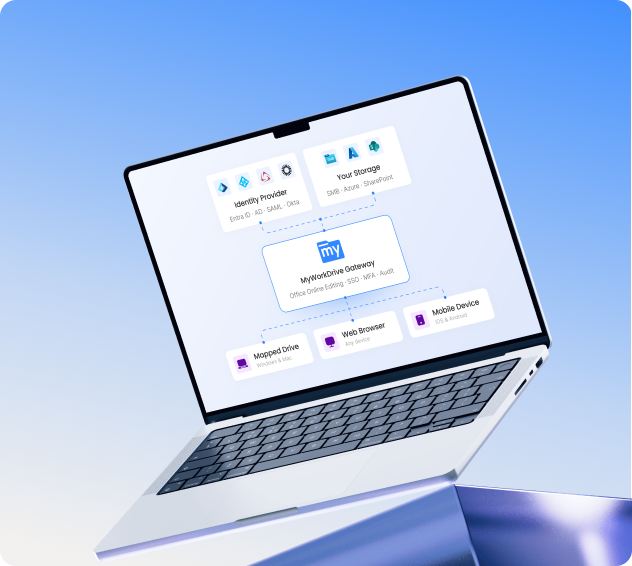
MyWorkDrive turns the file servers and cloud storage you already run into a private file sharing service your team can reach from anywhere. Nothing gets copied to a third party. Your permissions and audit logs keep working the way they do today.


KEY TAKEAWAYS
- Share files from the servers and cloud storage you already own. No VPN, no migration, no vendor holding your data.
- Staff reach files from a browser, a mapped drive, or a phone, with Office editing in the browser.
- Your identity provider, NTFS permissions, and audit logs stay in charge. MyWorkDrive cannot hand out access a user does not already have.
- Installs on existing Windows Server and Active Directory in minutes, with support for HIPAA, CMMC, GDPR, FINRA, and FIPS programs.
Sharing files for work should not mean a VPN connection, a migration project, or a support ticket. Most companies already keep their files on Windows file servers or in cloud storage they pay for. The problem is rarely the storage. It is getting people safe access to it from outside the office.
That is the gap MyWorkDrive fills. You install it on a domain-joined Windows Server, point it at the shares you want to publish, and put an SSL certificate on the IIS site it creates. People sign in with the same Active Directory or Entra ID credentials they already have, and they see a familiar set of folders in their browser. As far as your security model goes, very little changes. It is, in effect, file sharing software for your existing file servers rather than a replacement for them.
What is a secure file sharing service for business?
A file sharing service lets people store, open, and share files from any device with an internet connection. For consumer use, that is the whole story. For a business, the bar is higher: the service has to protect sensitive data, control who can open what, and keep a record of it, all without handing your files to someone else.
There are two ways to clear that bar. One is to move everything into a vendor's cloud and adopt their controls. The other is to leave files where they are and add a secure way in. MyWorkDrive takes the second route. It brokers an encrypted connection between your users and your storage, checks them against your own identity provider, and logs what they do. Your files never land on a MyWorkDrive server.
If you run file servers or cloud storage and need to give staff and outside collaborators safe remote access without uprooting any of it, this is written for you. If you are weighing a full move to a cloud suite instead, the comparison below is worth a read first, because the trade-offs are easy to underestimate.
Where consumer cloud tools fall short
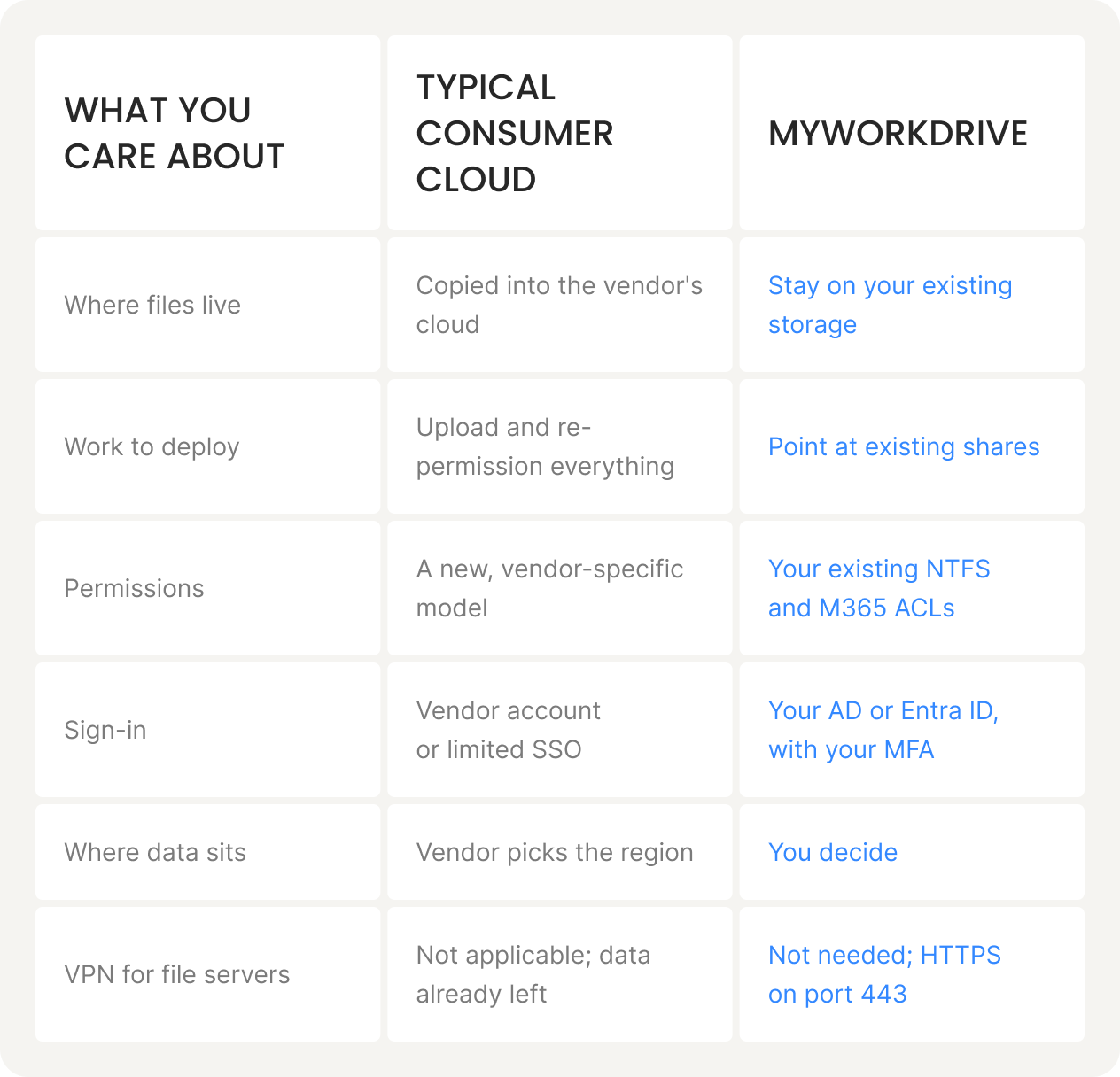
Google Drive, Dropbox, OneDrive, and Box are easy to start with, and for personal use they are fine. For a regulated business, the trade-off shows up later. All of them work by copying your files into someone else's cloud, and once the data lives there, decisions about residency, jurisdiction, and access are partly theirs to make.
The table below lays out the difference between that model and keeping files on storage you control.
There is a legal angle too. Under the U.S. CLOUD Act, data held by U.S.-based providers can be subject to lawful access requests even when the data center sits in another country. Keeping files on storage you manage gives you a clearer answer to where your data is and who can compel access to it.
Common risks, and what to do about them
Cloud file sharing changed how teams work together, and it brought its own set of risks. For enterprises, public agencies, and anyone with compliance obligations, these are the ones worth planning around.
Data breaches and security exposure

No platform is immune to attack, and a breach of a shared cloud service can put sensitive business data in the wrong hands.
WHAT HELPS
Pick a service with strong encryption and a small external footprint. MyWorkDrive exposes only HTTPS on port 443, which keeps commonly attacked ports such as SMB (445) and NetBIOS (139) off the internet, and uses TLS 1.2 or higher with TLS 1.3 where it is available.
Privacy and who owns the data
Putting files in a third-party cloud means trusting that provider with your data and how it handles it. Some scan content for their own purposes.
WHAT HELPS
Keep files on storage you own. Because MyWorkDrive never stores file content on its servers, there is no third party in a position to scan, mine, or move your data.
Data loss
Hardware failures, accidental deletions, or a provider winding down can all put files at risk.
WHAT HELPS
Keep the backup approach you already trust. MyWorkDrive works with your existing backups rather than replacing them, and it supports Windows Previous Versions, so people can restore earlier copies themselves from the web file manager.
Compliance and legal jurisdiction
Depending on your industry, you may face rules about where data sits and who can reach it. Files placed in a third-party cloud can fall under another jurisdiction's reach.
WHAT HELPS
Manage your own storage and use a service that brokers access without storing files. MyWorkDrive supports compliance work for CMMC, HIPAA, GDPR, FINRA, FedRAMP, and FIPS while the data stays with you.
Downtime
When a provider has an outage, access to critical files can go with it.
WHAT HELPS
Run on infrastructure you control, with redundancy sized to your needs. MyWorkDrive supports several servers behind a load balancer with a shared database for high availability.
Costs that creep up
Per-seat pricing, extra storage, and bandwidth charges make consumer-cloud bills hard to predict as a company grows.
WHAT HELPS
Keep files on storage you already pay for instead of renting capacity twice. MyWorkDrive adds secure access on top of what you have.
How MyWorkDrive works
MyWorkDrive sits between your users and your storage as a secure gateway. It recognizes your Active Directory domain and uses it for sign-in, so people get single sign-on with credentials they already know. An administrator chooses which existing shares to publish, and existing NTFS permissions and Access-Based Enumeration carry over unchanged. Every access is logged for security and compliance. Because access runs over HTTPS, it also works as a VPN replacement for file access.
It is not limited to Windows shares. The same access layer connects to Azure NetApp Files, Amazon FSx for NetApp ONTAP, Azure Files, Azure Blob with Data Lake Gen2, SharePoint Online, OneDrive for Business, NFS, and S3-compatible object storage.
-
01
Install on a Windows Server
Run the installer on an existing or new domain-joined Windows Server. A basic setup needs no SQL database, and most installs take minutes.
-
02
Connect your shares
Point MyWorkDrive at the shares and storage you want available remotely. Permissions are inherited, not rebuilt.
-
03
Add the secure entry point
Put an SSL certificate on the IIS site. Users connect over HTTPS, with your MFA and Conditional Access still enforcing.
-
04
Share and access
People open files in a browser, a mapped drive, or a mobile app, with full logging and optional DLP in place.
Most teams have MyWorkDrive running the same day they install it.
Security and data control
MyWorkDrive follows an application-level access model rather than a network-level one, so people reach files without the broad network exposure a VPN creates. A few specifics that matter for a security review:
For external collaboration, you create share links with expiration, passwords, and limits on downloading or editing, plus optional approval workflows. Microsoft Entra B2B guest access is supported when you need it. Related reading: Security and DLP and secure external sharing.
Compliance
MyWorkDrive supports your compliance efforts for programs including CMMC, HIPAA, GDPR, FINRA, FedRAMP, and FIPS. It does this by keeping your data, identity, and audit trail under your control rather than relocating them. It uses FIPS-validated cryptographic components where available, supports Windows FIPS mode, and holds a NIST FIPS 186-4 RSA algorithm validation certificate, number 3018.
One distinction worth being precise about: program certifications such as HIPAA or CMMC are achieved and maintained in your own environment. MyWorkDrive provides the safeguards that support them; it is not a substitute for your own compliance program. See the compliance overview for details by framework.
Healthcare
HIPAA-aligned access to clinical and administrative shares, with AD or Entra sign-in and full audit logging.
Legal
Controlled external sharing for client files, with expiring links and an audit trail for matters and discovery.
Finance
FINRA and FIPS-aligned controls, DLP, and device approval over files that stay on your own infrastructure.
Government & education
Data sovereignty and CMMC-aligned access for public-sector and campus environments without mass migration.
On This Page
Frequently Asked Questions
Can MyWorkDrive work with our existing Windows file server without migration?
Yes. MyWorkDrive connects to your existing SMB shares and publishes them over HTTPS. No files are moved, and your NTFS and share permissions stay authoritative. An administrator points it at the shares to publish, and Access-Based Enumeration is preserved.
Does MyWorkDrive replace our VPN for file access?
For file access, yes. Users connect over HTTPS on port 443 from a browser, a mapped drive, or a mobile app, so there is no VPN needed to reach files. This also keeps ports like SMB (445) and NetBIOS (139) from being exposed to external clients. A VPN can stay in place for any other network access you still need.
Are our files stored on MyWorkDrive servers?
No. Files stay on your storage and never persist on MyWorkDrive application servers. File contents are processed in memory only. For browser-based Office editing, files stage temporarily in your own OneDrive or SharePoint tenant and write back when saved, then clean up.
What storage can MyWorkDrive connect to?
Windows SMB shares, Azure NetApp Files, Amazon FSx for NetApp ONTAP, Azure Files, Azure Blob with Data Lake Gen2, SharePoint Online, OneDrive for Business, S3-compatible object storage, and NFS.
What compliance standards does MyWorkDrive support?
MyWorkDrive supports compliance efforts for CMMC, HIPAA, GDPR, FINRA, FedRAMP, and FIPS by keeping your data, identity, and audit logs under your control. It uses FIPS-validated cryptographic components where available and holds a NIST FIPS 186-4 RSA algorithm validation certificate, number 3018. Program certifications are achieved and maintained in your own environment.
How long does deployment take?
MyWorkDrive installs on an existing or new Windows Server in minutes, and most teams are sharing their first file shares the same day. A basic install needs no SQL database. For high availability you can run several servers behind a load balancer with a shared SQL Server or PostgreSQL database.
Can external users access files without a VPN or a new account?
Yes. External sharing uses links you control, with expiration, passwords, and download or edit limits, plus optional approval workflows. Microsoft Entra B2B guest access is also supported for external collaborators.
Stand Up Your Own Private File Sharing Service
Put secure remote access on the storage you already run, without moving a single file or giving up control. Start a free trial, or see it on your own shares in a short demo.