

By Scott Miller
Last Updated: April 22, 2026
The short answer
An AEC file sharing solution gives architecture, engineering, and construction teams secure access to project files from the office, home, and the job site. The trick is sending each file type to the network that actually suits it. Live CAD and BIM models belong on a fast LAN, in a vendor BIM cloud, or behind remote desktop. Documents, PDFs, drawing exports, RFIs, and contracts are safe to serve over HTTPS. MyWorkDrive handles that second job. It publishes your existing Windows file servers and cloud shares to web, mapped-drive, and mobile clients with no VPN and no data migration.
Key takeaways
- AEC firms run two very different workloads, live design models and everything else, and no single tool serves both well.
- Heavy multi-user models such as Revit, Civil 3D, and point clouds need a LAN, a BIM cloud, or remote desktop. The same is true for VPNs and HTTPS gateways, because of how these applications handle latency and file locking.
- MyWorkDrive fits the majority of project data: Office files, PDFs, specs, contracts, photos, RFIs, and transmittals that do not need LAN-grade transactional access.
- Files stay on your existing Windows file servers or cloud storage. There is no migration, no exposed SMB, and no full-network VPN.
- Built-in DLP, device approval, and audit logging map to HIPAA, GDPR, CMMC, and FedRAMP, which matters for AEC firms on government and regulated contracts.
If your CAD models open fine in the office but crawl from home, or your VPN buckles whenever the field team pulls a drawing set, you already understand the core problem of AEC file sharing. The industry runs on file types that behave very differently over a network, and most bottlenecks come from treating them the same.
This guide splits the problem into the two workloads that matter, shows which access pattern each one needs, and explains where a secure gateway like MyWorkDrive belongs. It also says plainly where MyWorkDrive does not belong, so you end up with a setup that is fast for staff and defensible to your security team.
What is an AEC file sharing solution?
An AEC file sharing solution is the mix of storage, network, and access tools that lets architecture, engineering, and construction teams reach project files wherever they work. A typical office mostly handles Word and Excel. An AEC environment also juggles DWG and DGN CAD files, Revit (RVT) and IFC BIM models, Civil 3D infrastructure models, GIS data, point clouds, and thousands of PDFs, photos, RFIs, submittals, and contracts.
The job is not to dump everything into one place. It is to match each file type with a network pattern it can actually tolerate, then give every user one source of truth so nobody is emailing "FINAL_v7_REALLY.dwg" around at 11pm.
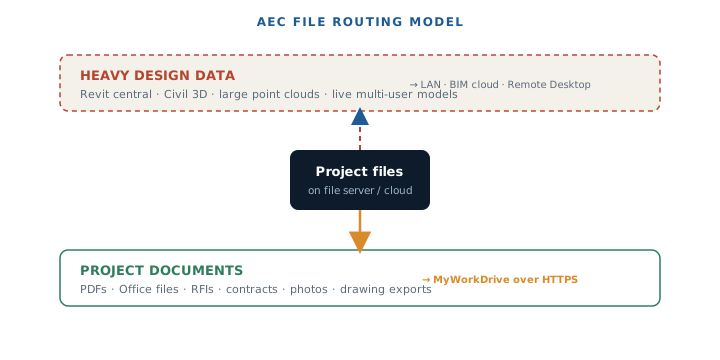 Fig. 1 — The first decision in AEC file sharing: send live models and documents down different paths.
The two AEC workloads, and why they fight each other
1. Live, multi-user design data
Revit central models and worksharing folders, Civil 3D and infrastructure models, and large reference point clouds all want constant, low-latency access to local storage. They lock and unlock files many times a second and assume the storage sits on the same gigabit LAN. Put a firewall, WAF, or home broadband link between the application and the file, and you start seeing slow performance, timeouts, and in some cases model corruption.
2. Supporting project documentation
This is the bigger pile by file count: Word, Excel, PowerPoint, and PDFs; specifications and contracts; RFIs, submittals, and meeting minutes; plus photos, markups, site reports, and as-builts. These files open fine over HTTPS. They do not need LAN-grade transactional access, and they happen to be exactly what your field staff, owners, and outside consultants ask for most.
The trap most firms fall into is trying to make one tool serve both. Force a Revit central model through a VPN and users revolt. Lock all your PDFs behind a slow VDI session and you have spent money to make easy work hard. The answer is not a better single tool. It is routing the right file to the right path.
The file-type routing model
Below is the decision matrix MyWorkDrive's engineers use when scoping an AEC deployment. It leans conservative on purpose. When a file type is borderline, send it to remote desktop rather than risk a corrupt model.
MyWorkDrive enforces this matrix with file-type block/allow lists and size limits. QuickBooks, Microsoft Access, and PST files are blocked by default, and you can add specific CAD or BIM extensions so a user cannot accidentally drag a 4 GB Revit file through the web client and wonder why it hangs.
The recommended hybrid architecture
Combine the two workloads and a clean reference architecture falls out. Live models stay where they perform. Documents get a secure entry point. Your security team gets one identity-aware gateway to audit rather than a wide-open VPN.
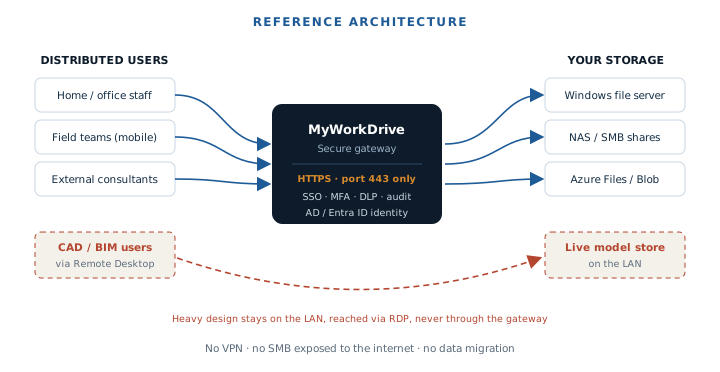 Fig. 2 — Documents flow through one HTTPS gateway. Live models never leave the LAN.
MyWorkDrive vs. VPN vs. cloud sync
For the document layer, most AEC firms weigh three options. Here is how they compare on the factors that decide AEC projects.
This is why MyWorkDrive reads as a VPN replacement for file access rather than a cloud-sync competitor. You get the remote reach people expect from the cloud while keeping the control of an on-premises file server.
Core capabilities to look for in an AEC file sharing solution
Performance and large-file handling
You want access on demand instead of pre-syncing whole multi-gigabyte folders, plus sensible limits for files that are simply too big for a 20 Mbps upload. MyWorkDrive serves SMB over HTTPS on demand and ships a mapped-drive client that feels close to gigabit LAN speed for documents. Size limits keep unsupported design files from being opened over the internet.
File locking and version control
Centralized locking stops two people overwriting each other when they open the same spec. MyWorkDrive provides locking and version-conflict prevention for supported files, including Office documents via web, mapped drive, or mobile, and supports real-time co-authoring with Office 365 and Office Online Server on files that live on your existing SMB shares.
Integration with your existing AEC stack
The right tool sits beside Autodesk Construction Cloud or BIM Collaborate, not on top of them. MyWorkDrive publishes Windows file servers, NAS, Azure Files, and Azure Blob, and coexists with your BIM platform as the secure gateway for the rest of the project file landscape. It does not duplicate large design datasets.
Security and compliance for regulated AEC work
Government, defense, and infrastructure projects increasingly arrive with contractual data-custody clauses. MyWorkDrive wins these deals because your files never leave infrastructure you control unless you choose to allow it.
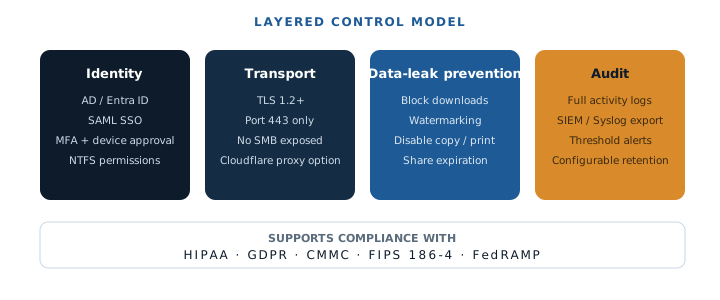 Fig. 3 — Four control layers, all enforced on infrastructure you own.
MyWorkDrive integrates with Active Directory or Entra ID for SAML SSO, MFA, and granular NTFS enforcement, then adds DLP, watermarking, share expiration, device approval, and exportable audit trails. If your firm is handling owner NDAs, defense contracts, and EU data-residency rules at the same time, that mix of controls is what keeps each project compliant.
Use cases by AEC segment
Architecture firms
Centralize proposals, planning submissions, and presentation decks. Send design PDFs and image boards to clients through scoped, expiring links instead of consumer file-transfer sites. Keep live Revit or ArchiCAD models in your BIM platform while every supporting document flows through MyWorkDrive.
Engineering companies
Share analysis reports, calculation packages, and standards libraries under strict access controls. Field engineers open the latest PDFs, spreadsheets, and inspection templates on a tablet through the mobile app, so they always have the current version rather than a stale email attachment.
Construction contractors
Run a single document hub for RFIs, submittals, change orders, and site instructions that both office and field teams can reach. At closeout, give owners and facility managers audit-friendly access to handover documentation, with full logs of who opened what and when.
How to deploy a secure AEC file sharing solution
- Classify your files. Separate live design data from supporting documentation using the matrix above.
- Route design files correctly. Keep live models on the LAN or BIM cloud, and give remote modelers remote desktop or VDI on the same network as that storage.
- Publish document shares with MyWorkDrive. Install on Windows next to the file server, then publish project shares to web, mapped drive, and mobile over HTTPS. No migration needed.
- Structure shares by project. Mirror your client, project, and discipline folder tree, and align NTFS and MyWorkDrive share settings to AEC roles such as design, commercial, site, and external consultant.
- Apply governance. Turn on block/allow lists and file-size limits so heavy CAD and BIM files never open over the internet.
- Lock down identity and DLP. Enforce SSO, MFA, device approval, watermarking, and audit logging to satisfy contracts and regulators.
See it on your own file server
Install MyWorkDrive next to an existing Windows share and give your field team VPN-free access the same afternoon. No data migration, no credit card.
Start a free trialBook a demoView pricing
Frequently asked questions
What is an AEC file sharing solution?
It is a platform that gives architecture, engineering, and construction teams secure access to project files from the office, home, and job site. The strongest solutions route each file type to the network it can safely support: live CAD and BIM on a LAN, BIM cloud, or remote desktop, and documents over HTTPS. MyWorkDrive handles the document layer by publishing your existing Windows file servers and cloud shares with no VPN and no data migration.
Can I share CAD and BIM files like Revit and Civil 3D over the internet?
Live, multi-user models should not be opened directly over a generic HTTPS gateway or VPN. They expect constant low-latency LAN access and frequent file locking, which the open internet cannot guarantee, so you risk slow performance or corruption. Open live models on a fast LAN, in the vendor's BIM cloud, or via remote desktop. MyWorkDrive serves the document layer and uses block lists and size limits to send heavy design files to the right tool.
Does MyWorkDrive require migrating our project files to the cloud?
No. MyWorkDrive publishes your existing Windows file servers, NAS, Azure Files, and Azure Blob storage to remote users without moving the data. Your folder structures, NTFS permissions, and backups stay as they are, which is how AEC firms meet data-sovereignty and custody requirements while still adding remote access.
Is MyWorkDrive a secure VPN alternative for AEC firms?
Yes. It provides zero-trust, VPN-free access over a single HTTPS port (443) with no exposed SMB and no full-network tunnel. External consultants, owners, and field staff get scoped access to specific project shares rather than the whole network, which shrinks the attack surface and removes most VPN performance complaints for document work.
What security and compliance controls does MyWorkDrive provide?
AD and Entra ID integration, SAML SSO, MFA, granular NTFS enforcement, device approval, watermarking, share expiration, DLP for download and clipboard restrictions, and exportable audit logs to SIEM. It maps to HIPAA, GDPR, CMMC, FIPS 186-4, and FedRAMP, and it keeps files on infrastructure you control.
How do we phase MyWorkDrive in alongside our BIM collaboration tools?
Start by sorting files into true collaborative design data versus supporting documentation. Keep live CAD and BIM in your BIM platform or on a LAN reached through remote desktop. Use MyWorkDrive for documents, specs, PDFs, photos, and admin files. Then apply block/allow lists so each file type uses the access path that suits it.